
Automate Your Entire
Property Finder Feed
With Real-Time 2-Way Sync
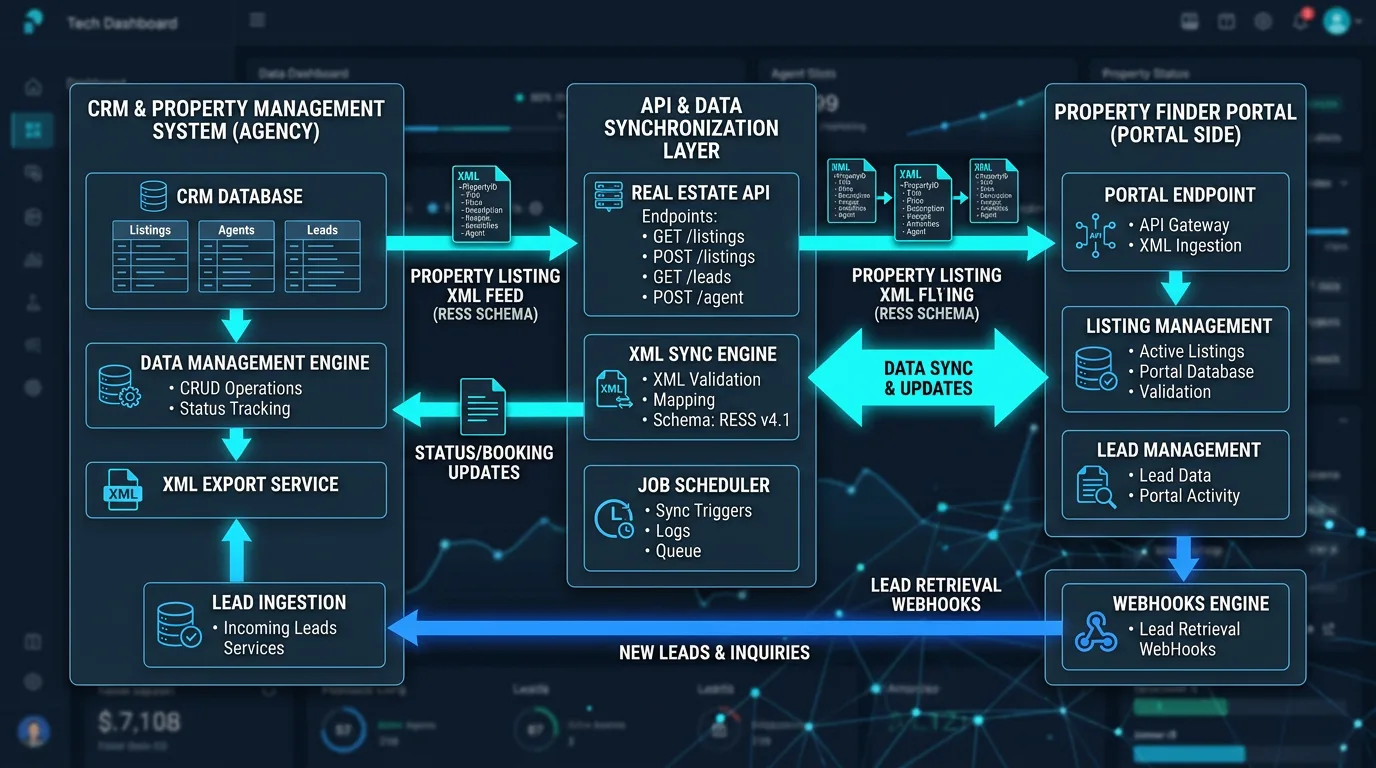
Eliminate double data entry, prevent delisting penalties, and capture buyer leads instantly. Dev Zonia connects your CRM or property management system directly to Property Finder via automated XML feeds and REST APIs — ensuring 100% Trakheesi permit compliance, live price updates, and sub-3-second lead delivery.
Manual Portal Updates Are Costing You Time & Fines
Managing 200+ listings by logging into portal dashboards by hand creates price discrepancies, expired permit fines, and missed inquiries.
Friction, Delays & Regulatory Risk
- Hours Wasted Copy-Pasting: Listing coordinators spend 20+ hours a week re-uploading photos, typing descriptions, and checking boxes.
- Trakheesi Permit Fines: A listing remains live after the DLD permit expires, resulting in hefty regulatory penalties from RERA.
- Price Inconsistencies: A landlord lowers the price, but the listing is updated on your site while staying outdated on Property Finder.
- Stale Sold Inventory: A closed unit is not delisted quickly enough, creating bad buyer experiences and wasted marketing budget.
Hands-Free Autonomous Syndication
- Publish Once, Live Everywhere: Add or edit a property inside your CRM. The XML engine validates and pushes it to Property Finder automatically.
- Automated Permit Expiry Locks: The system tracks Trakheesi expiration dates and automatically alerts agents or unpublishes to protect your license.
- Instant Price & Status Updates: Price drops and status adjustments synchronize in minutes, keeping your agency 100% accurate.
- Sub-3-Second Lead Ingestion: Every lead from email, WhatsApp, or phone clicks on Property Finder lands in your CRM in real time.
Deep Property Finder Integration Capabilities
Built in strict accordance with Property Finder RESS (Real Estate Syndication Schema) standards and OpenAPI protocols.
RESS v4.1+ Schema Compliance
Our engine formats XML nodes precisely to Property Finder’s technical specifications, preventing rejected feeds and validation errors.
- Strict XML schema validation before transmission
- Automated error logs with precise line number reporting
- Residential, commercial, and off-plan node support
Trakheesi & RERA Automation
Direct fields for Trakheesi permit numbers, Form A validation, and automatic QR code generation required for Dubai real estate listings.
- Trakheesi permit format validation
- Automated QR code embedding on listing photos
- DLD compliance status indicator
High-Speed Image Pipeline
Automatic photo optimization, image ordering, automated agency watermarking, and CDN delivery to ensure crisp listing galleries.
- Automated resolution check (> 800x600 px)
- Matterport 3D tour URL & 360-degree tags
- Floor plan PDF & image tagging
Real-Time Lead Webhooks
Receive Property Finder inquiries the second a buyer taps "Call", "Email", or "WhatsApp" on your listing.
- Sub-3-second webhook payload delivery
- Full listing reference & price captured
- Immediate auto-assignment to listing broker
Broker BRN & Profile Mapping
Maps each listing automatically to the assigned agent’s Property Finder broker account, BRN license, and direct contact details.
- Agent BRN number verification
- Agent profile photo & direct WhatsApp assignment
- Lead attribution directly to assigned agent
Portal Performance Analytics
Track impressions, listing views, lead conversion rate, and cost-per-lead for your Property Finder investment in one dashboard.
- Cost per lead (CPL) calculation by community
- Audit log of all sync events & timestamps
- Identification of underperforming listings
How the Synchronization Flow Operates
Continuous, automated synchronization ensuring your listings and leads are always in sync.
Listing Created
Property added in Dev Zonia CRM with specs, photos, pricing, and Trakheesi permit number.
XML Generation & Check
Engine verifies required fields, compresses media, formats RESS XML, and compiles the feed.
Portal Ingestion
Property Finder ingests the feed and updates your active listings, badges, and pricing in real time.
Instant Lead Webhook
When a buyer inquires, Property Finder fires a webhook directly into your CRM within 3 seconds.
Dev Zonia Sync vs Manual Portal Ingestion
The difference between enterprise automated feeds and slow manual updates.
| Specification | Manual Portal Dashboard | Basic Third-Party Plugin | Dev Zonia Two-Way Sync |
|---|---|---|---|
| Listing Update Speed | Hours (Manual) | Every 24 Hours | ✔ Real-Time / Hourly Sync |
| Lead Ingestion Latency | Email check (Slow) | 15 – 30 minutes | ✔ Sub-3-Second Webhook |
| Trakheesi Expiry Validation | ✖ High Fine Risk | Partial | ✔ Automated License Guard |
| Automated Watermarking & QR | Manual Photoshop | ✖ | ✔ Built-in Dynamic Image Pipeline |
| Supported Regions | All | UAE Only | ✔ UAE, KSA, Qatar, Bahrain, Egypt |
Frequently Asked Questions About Property Finder Integration
Clear answers regarding setup requirements, XML feeds, and webhooks.
What do we need from Property Finder to start the integration?
You simply need an active Property Finder broker account. We contact your Property Finder account manager to activate feed syndication for your company, obtain your company ID and API credentials, and set up your exclusive XML feed URL.
How frequently does the feed synchronize with Property Finder?
By default, your XML feed generates in real time whenever requested by Property Finder’s crawler, typically multiple times per day. Crucial updates (e.g. status changed to Reserved or Sold) can trigger instant delisting updates to prevent duplicate fines.
How does the system ensure Trakheesi permit compliance in Dubai?
Every Dubai listing requires a valid Trakheesi permit number before being approved for feed generation. The system verifies permit formatting, tracks permit expiration dates, and automatically burns the official QR code and permit stamp into listing photos where required.
Can we choose which listings go to Property Finder vs other portals?
Yes. For every property, you have granular checkboxes (Publish to Property Finder, Publish to Bayut, Publish to Website, Off-Market). You have full control over where each unit is syndicated.
Does the integration work for countries outside UAE (e.g. Saudi Arabia, Egypt)?
Yes. Property Finder operates across the UAE, Saudi Arabia, Bahrain, Qatar, and Egypt. Our RESS XML feed generator supports all localized regional requirements, including multi-currency and regional location taxonomies.
What happens if an XML feed fails or has a validation error?
Our sync engine includes an automated pre-flight validator. If an agent forgets a mandatory field (e.g., missing price or missing bedroom count), the system flags the property before sending, preventing feed-wide rejections. Detailed error logs are visible directly in your admin dashboard.
Stop Updating Property Finder by Hand
Connect your existing database or CRM to Property Finder with zero downtime. Talk with our integration specialists to get your feed verified and running.